LANDSCAPING DESIGN & BUILD

Every project captured, tracked, and approved

When a homeowner books a site visit, that project needs to move forward, not stall between estimates and approvals. HiWork gives landscaping companies a structured workflow from site evaluation to completion sign-off, with clear steps, approvals, and full history visibility.

When a homeowner books a site visit, that project needs to move forward, not stall between estimates and approvals. HiWork gives landscaping companies a structured workflow from site evaluation to completion sign-off, with clear steps, approvals, and full history visibility.

A man in a green shirt and some bricks

Project request

Invoice approved

A man in a green shirt and some bricks

Project request

Invoice approved

THE PROBLEM

Landscaping projects have too many details to keep track of

Landscaping projects have too many details to keep track of

A client calls about redoing their backyard. You visit the property, take measurements, and snap photos on your phone. Later that day, the client texts a new idea about adding a fire pit. Your crew sends specs for another project over WhatsApp. A different client emails new info about their front yard.


By the time you sit down to write the proposal, half the details are spread across texts, calls, photos, and emails. And you haven't even sent it to the client yet.


That's when things go wrong. The proposal goes out late. Details get missed. The price doesn't match what was discussed. And nobody can say for sure what was agreed to.

THE SOLUTION

When landscape projects run on HiWork

When landscape projects run on HiWork

Every site visit becomes a tracked project. Every project follows a clear path.

Every project's context is in one place

Estimates, site notes, and proposals all live with the job record. Nothing gets buried in texts or emails.

Always know who owns the next step

Each stage is clearly defined, so your team never has to guess where a project stands or what the next step is.

Keep proposals and scope changes moving

Internal reviews and client approvals happen at defined checkpoints, not in a back-and-forth text chain.
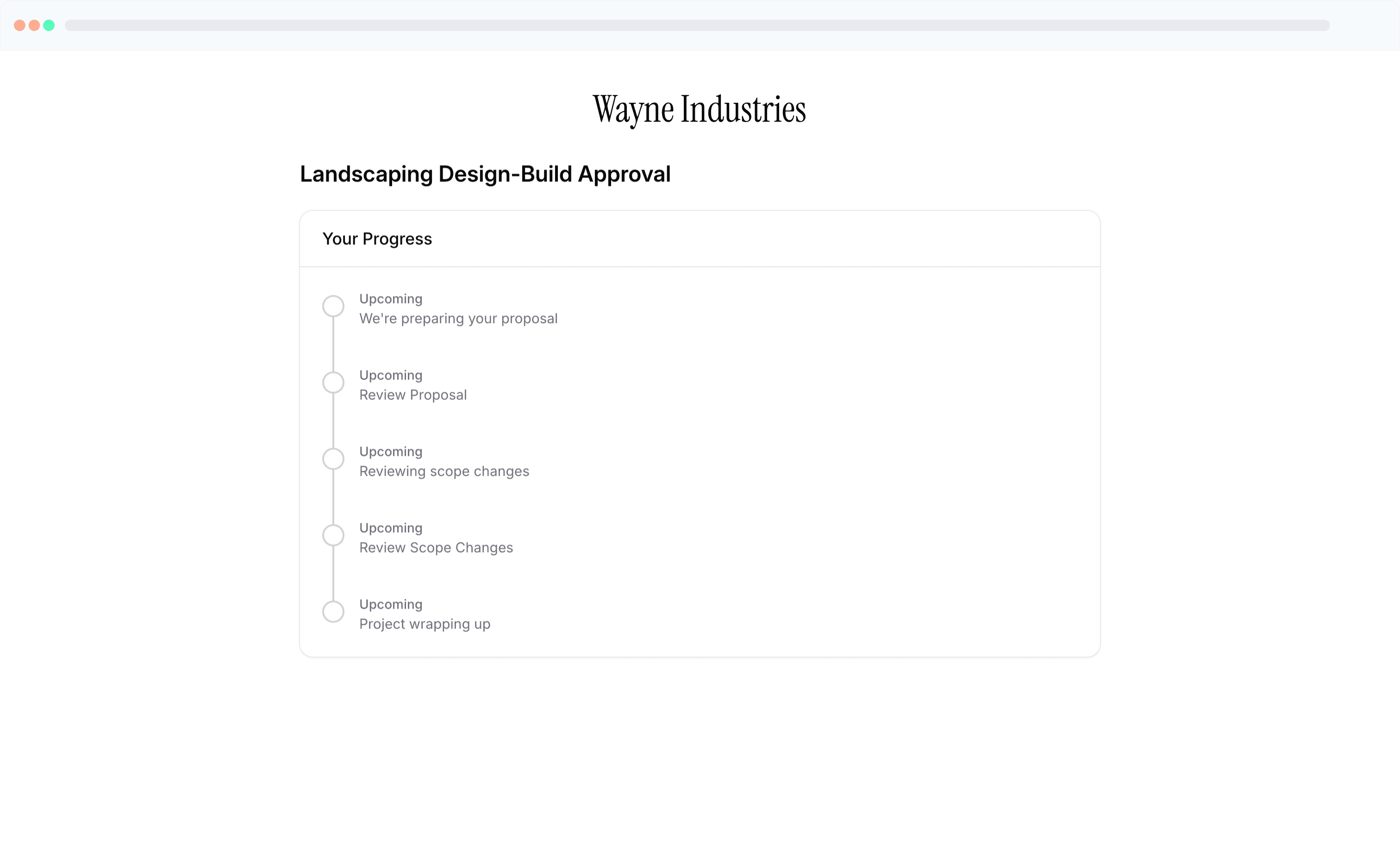

hiwork client portal with steps

LANDSCAPING TEMPLATE

Start with a ready-to-use landscaping workflow template

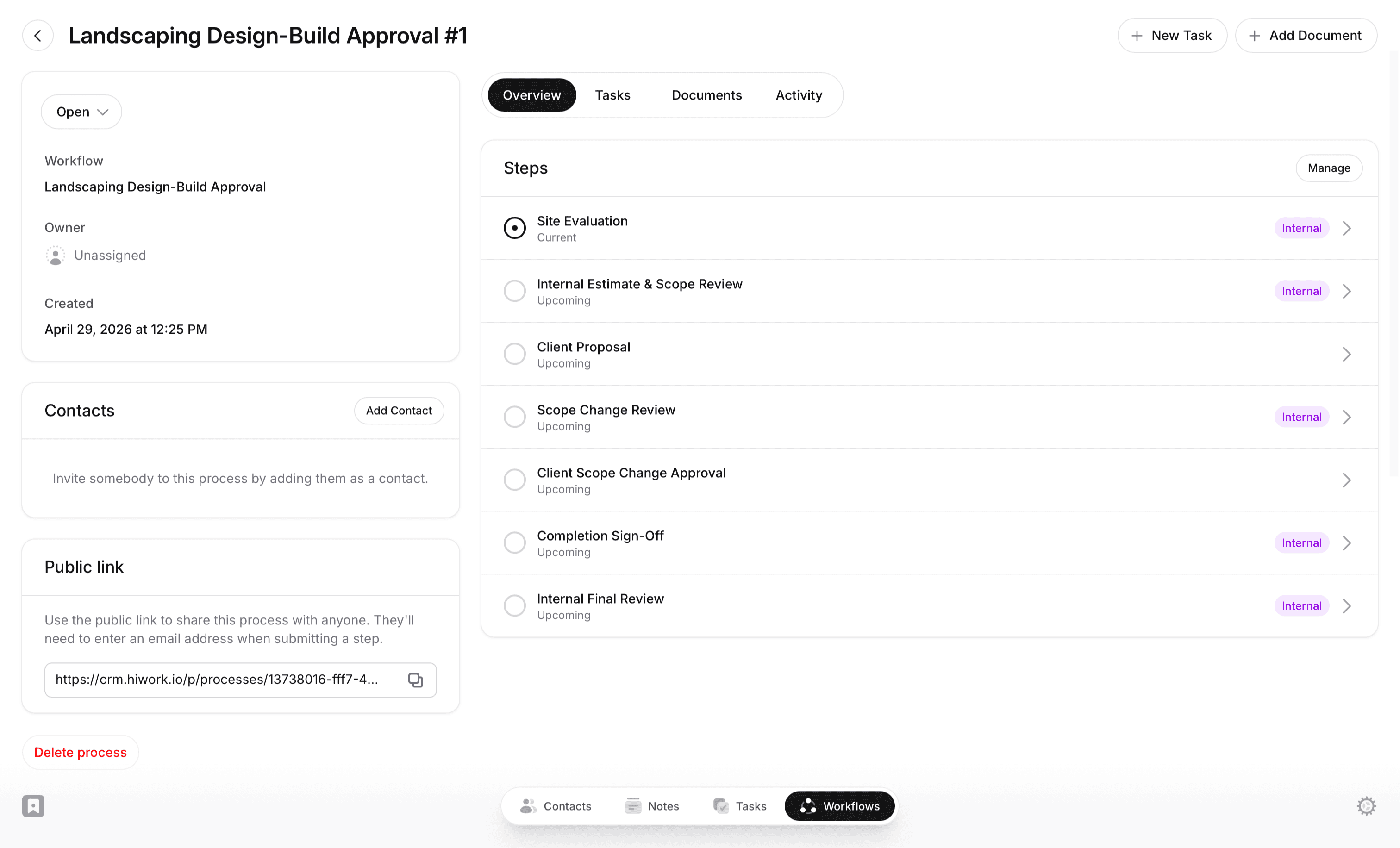
HiWork includes a Landscaping Design-Build Approval template you can use as-is, or adjust to match exactly how your team works. Each step has defined owners, custom fields to collect project details, and approval logic built in.

Use it as-is, add your own steps, or start from scratch..

HiWork includes a Landscaping Design-Build Approval template you can use as-is, or adjust to match exactly how your team works. Each step has defined owners, custom fields to collect project details, and approval logic built in.

Use it as-is, add your own steps, or start from scratch..

HiWork template

WORKFLOWS

Build the exact project structure your team needs

Build the exact project structure your team needs

The landscaping workflow is ready to use on day one. Add steps, change fields, or build something completely different. HiWork adapts to how your team works.

The landscaping workflow is ready to use on day one. Add steps, change fields, or build something completely different. HiWork adapts to how your team works.

Use a template or start fresh

Start with a template, customize it to match your process, or build your own from the ground up.

Add fields and owners

Collect the information you need at each step. Define who's responsible for reviews and decisions.

Run processes with full visibility

Each project moves through with full visibility. See status, history, and next actions at a glance.

PLATFORM

One platform. Any workflow.

One platform. Any workflow.

Landscaping projects are just one example. HiWork's workflow engine handles any multi-step process with approvals, including client onboarding, project intake, change orders, and more.

Landscaping projects are just one example. HiWork's workflow engine handles any multi-step process with approvals, including client onboarding, project intake, change orders, and more.

Build exactly what you need:

  • Unlimited steps and transitions

  • Custom fields per step (text, files, dropdowns, dates)

  • Approve, reject, or route to different paths

  • Internal steps and client-facing steps (visible in portal)

  • Public links for external submissions

  • Full audit trail of every action

  • Unlimited steps and transitions

  • Custom fields per step (text, files, dropdowns, dates)

  • Approve, reject, or route to different paths

  • Internal steps and client-facing steps (visible in portal)

  • Public links for external submissions

  • Full audit trail of every action

HiWork workflows and crm

WHY HIWORK?

For teams that turn site visits into completed projects

For teams that turn site visits into completed projects

HiWork gives your team a structured way to run landscaping projects, so site visits, proposals, scope changes, and final sign-offs all move forward.

HiWork gives your team a structured way to run landscaping projects, so site visits, proposals, scope changes, and final sign-offs all move forward.

a woman sitting at a desk talking on a cell phone

Landscaping Designers

Know exactly where every job stands. Assign, review, and track from site visit to sign-off.

a man wearing a red hard hat and jacket

Crew Leads & Field Teams

See what's assigned, what's approved, and what needs to happen next.

man using smartphone on chair

Owners & Partners

Every project has a paper trail. Site notes, proposals, changes, and sign-offs, all documented.

Private & Secure

Private & Secure

HiWork is engineered with industry best practices. Security and privacy are a core feature.

Your data is always encrypted

Your data is always encrypted

Your data is always available just to you

Your data is always available just to you

FEATURES

What you get with HiWork's workflow

What you get with HiWork's workflow

Client self-serve intake forms
Collect property details, project ideas, and photos before the first site visit, so every project starts with the context your team needs.

Keep approvals moving forward
Add review checkpoints for proposals and scope changes, so pricing and decisions get confirmed before the crew breaks ground.

Centralized client workspace
Site photos, measurements, proposals, scope changes, and sign-off documents all live next to the workflow steps and decisions.

Progress tracking and client visibility
See where each project stands and what's next, while clients check progress through the client portal.
HiWork workflows and crm

FAQs

Frequently asked questions

Frequently asked questions

Common questions about running landscaping projects on HiWork.

Common questions about running landscaping projects on HiWork.

What is HiWork?

HiWork is a workflow platform. It's built for service teams that have outgrown spreadsheets and group chats but don't need complex enterprise field service software. You get structured steps, approvals, and visibility without the overhead.

Can I customize stages for different job types?

Yes. Create separate workflows for design-build, maintenance contracts, hardscape installs, or anything else. Each workflow has its own stages, required information, and approval steps.

Can clients submit information or sign off on proposals?

Yes. You can share a public link so clients submit their project request or review a proposal directly. Their submission moves the project to the next step automatically.

How do approvals work?

Each step can include approval logic. Reviewers approve, reject, or request changes. Decisions move the project forward, back, or down a different path, with a full record of what happened and why.

Does HiWork replace my landscaping estimating or scheduling software?

No. HiWork doesn't replace your estimating or scheduling tools. It adds structure to the process around your projects, including site visits, proposals, scope changes, and final sign-offs. Nothing gets missed as work moves forward. Instead of tracking projects across texts, calls, and spreadsheets, each project follows a clear set of steps. Information is captured as the work progresses, decisions are reviewed before moving forward, and everything stays connected to the project from start to finish. This gives your team a consistent way to manage work beyond scheduling, so every site visit turns into a completed, documented project.

Is HiWork only for landscaping companies?

Landscaping is just one example. Companies use HiWork to manage any process that involves moving people or information through steps, collecting documents, and getting approvals.

CRM + WORKFLOWS

One platform. All your workflows.

No credit card required

Fast and easy onboarding

CRM + WORKFLOWS

One platform. All your workflows.

No credit card required

Fast and easy onboarding

CRM + WORKFLOWS

One platform. All your workflows.

No credit card required

Fast and easy onboarding